


Godot 2.0
A little more than two years ago, Godot was open sourced. It was meant to be an in-house tool and, while it worked for use in internal projects, it was far from the usability expected when you have thousands of developers working with it.
After a year of hard work and community feedback, Godot 1.0 was released, marking the first version that was ready for general consumption. This version worked well but we felt it was still far from the usability and features of a modern game engine. The more urgent issue was to improve the 2D engine so we worked hard again and released Godot 1.1, which did in fact improve 2D rendering considerably.
Usability still remained a pressing issue, so we made a long list of tasks to improve upon for 2.0. We worked hard and after about 8 months we now finally have a stable Godot ready for you!
This release is special because our team has grown a lot. We have more regular contributors, a documentation team, a bug triage team and a much larger community! Godot keeps growing and becoming more and more awesome.
New core features
While for 2.0 core changes were not a priority, there are some nice improvements on this release!
Improved scene instancing
Instancing is one of Godot’s best features. For this version it has been further improved. Previously, only the root node of a scene was editable. Changes to sub-nodes would result in data loss.
It is now possible to edit any children node of the instanced scene and have the changes persist. Even sub-instances of instances can be edited with persistent modifications.
Scene inheritance
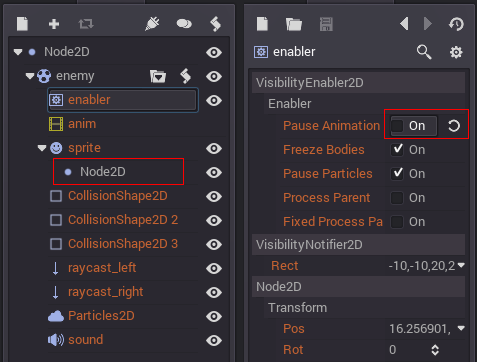
Begining Godot 2.0 scenes can not only be instanced but also inherited. This allows many interesting use cases such as:
- Having a base scene (ie, enemy, collectable, obstacle, etc.) with a node hierarchy common to all (like explosions, shines, indicators, etc), and then extend it for each class.
- Making non-destructive changes to a scene that was imported (ie a 3D scene, etc.)
- Making non-destructive changes to a scene created by another team member.
New text-based scene format
Godot supports the XML format for saving scenes and resources, but we had problems with it:
- Scenes are saved packed in xml, so the content is uncomprehensible.
- The format is not efficient to parse.
- It is not friendly to VCS (Git, SVN).
- XML is not easy to write manually, and it’s easy to make mistakes.
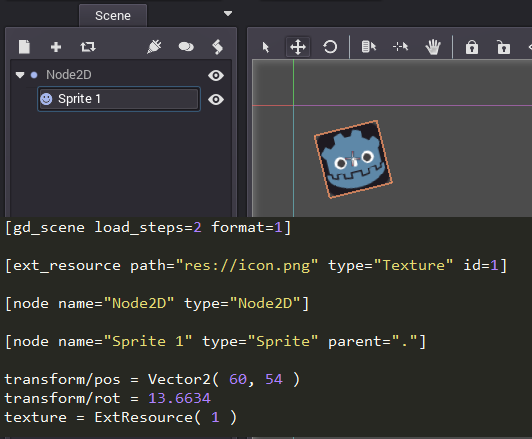
Having this in consideration, Godot 2.0 adds a new text file format inspired by TOML. This new format is descriptive (human friendly) when saving scenes, and Git/SVN friendly:
For 3.0, this format will be the only text based format supported, and XML will be deprecated.
onready & singletons
Initializing class member variables can be quite of a hassle, code such as this is common in GDScript:
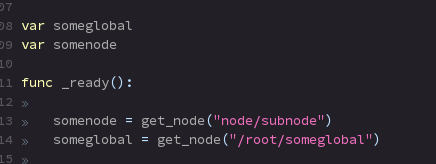
The ‘onready’ keyword allows initialization of class member variables at the same time when _ready is called, saving some code:

But doing this for autoloaded scenes can still be a hassle, as it has to be done every time a script is created. To ease on this, it’s possible to make an autoloaded scene or script a singleton variable (accessible at global scope) in the project settings:
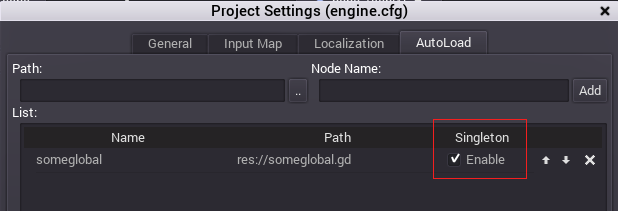
All this, of course, working together perfectly with code completion.
Other new core features
Smaller new core features were also added:
- Support for ZIP packs on export instead of PCK
- Support for OPUS Audio Format
- Changed to a more compatible JPG decoder.
- Very improved gamepad support
New editor features
The Editor part of Godot 2.0 is where most of the work was focused. The priority was to improve tools and make the workflow more efficient.
New layout and theme
Godot 2.0 sports a new theme courtesy of Andreas Esau. It looks more professional and less confusing than the previous one. Many unneccesary icons, margins, arrows, etc. were removed to further clean up the visuals.
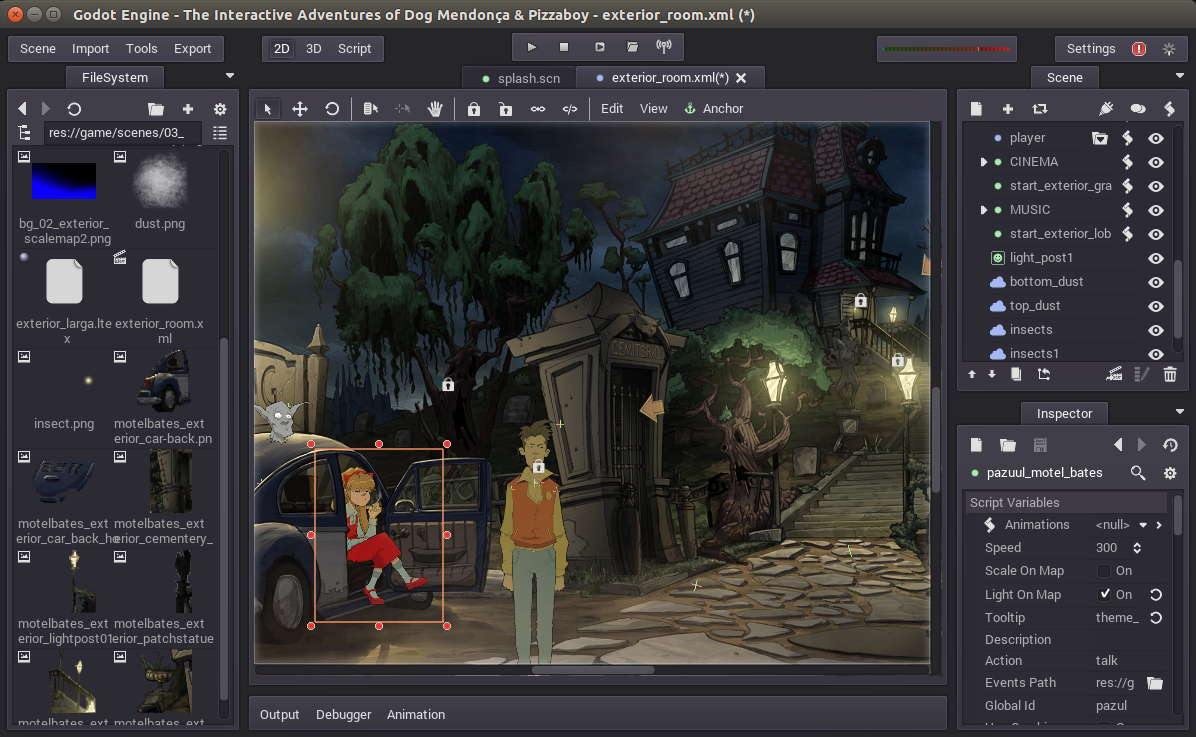
As a plus, dock panels (which were previously fixed on the right) can now be moved and rearranged.
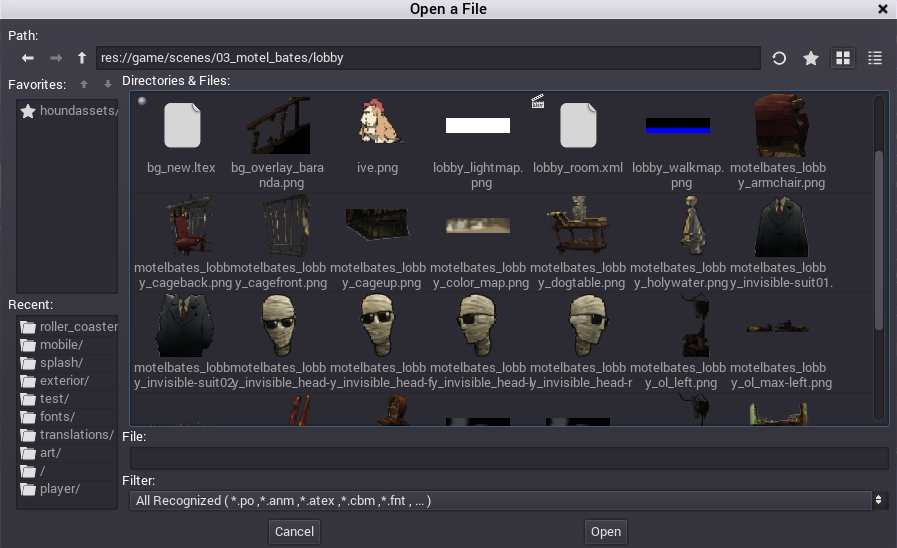
New file dialog
One of the common hurdles with Godot was the overly simple file dialog:
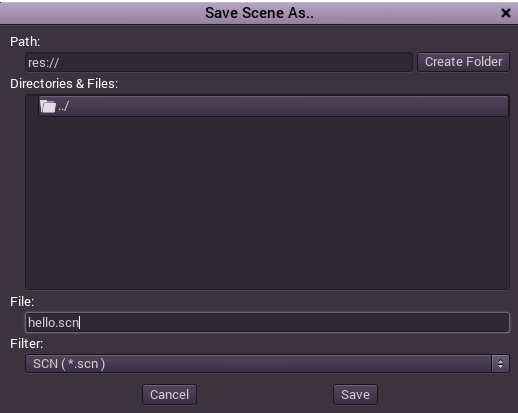
For 2.0 we have created a new one, which supports:
- Navigation History
- Favorites
- Recent Folders
- Thumbnail Previews (and list view compatibility mode)
New filesystem dock
Godot used to have a primitive tree dock panel view with all the project resources. This was replaced by a more modern filesystem dock:
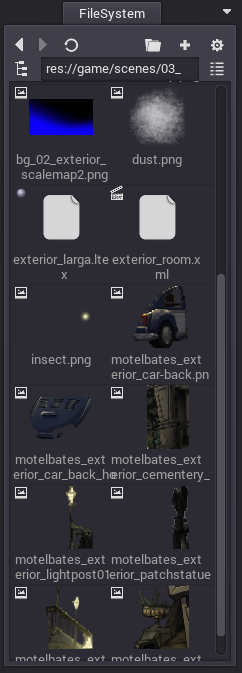
This new panel can show resources in both thumbnail and icon view (similar to File Dialog), but it also includes several tools.
By popular request, Godot’s new filesystem dock has tools to allow the user to:
- Rename and move files and fix all resource/scene dependencies automatically.
- Warn when files being deleted are referenced by other resources.
- Use a heuristic to search for broken dependencies within the project.
- Visually explore and reassign dependencies for a given resource.
- Explore the owners for a given file.
- Explore which resources might be orphan, for easier clean up.
Multiple scene editing
Godot’s divide and conquer approach to making games relies on subdividing scenes in several sub-scenes, each with an identity or function.
Godot 2.0 improves upon this with multiple scene editing support, allowing several scenes to be open at the same time. Switching between them is painless and Godot also automatically reloads scenes when a dependency (instance or inheritance) has changed.

New tool layout
In Godot, tools appear contextually when a given node or resource is selected. This makes the UI flow fast and removes large part of the need to maually organize panel layouts.
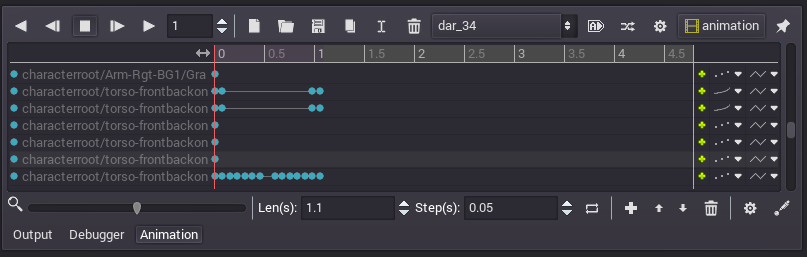
This aspect of Godot was also improved in 2.0 with the introduction of a new bottom panel. On it, contextual editors can make a tidy appareance. Some of the editors are also always shown with persistent buttons:
- Output console
- Debugger
- Animation editor
New code editor
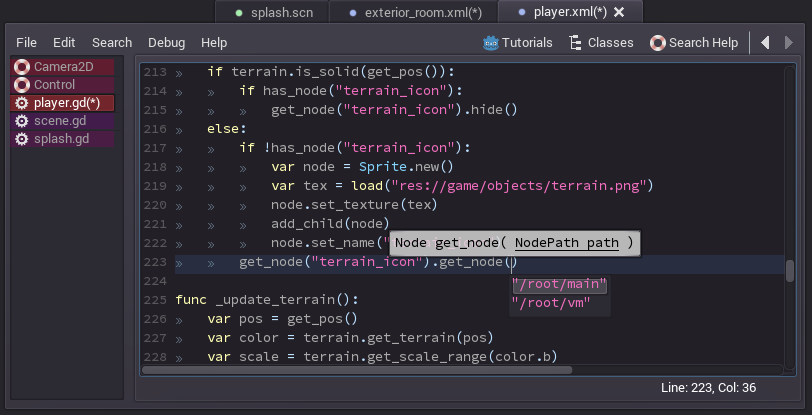
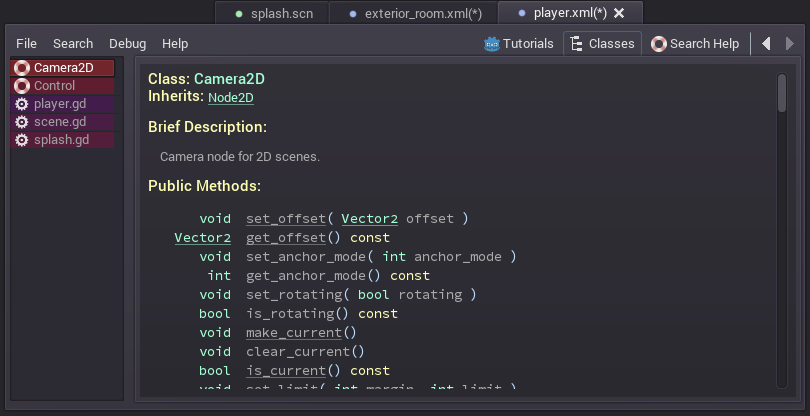
Godot has the code editor integrated to the rest of the editors. Until Godot 1.1, scripts were opened contextually to the scene being edited but, as multiple scenes can now be edited, this is no longer possible.
To compensate, the new code editor now works more similar to an IDE, where scripts are just opened all the time. Switching to a scene will also automatically switch to it’s dominant script (script in the root node, where it’s most commonly placed), making the programming experience smoother.
The code editor also has many new features:
- List of opened scripts, as using tabs would mean running out of space quickly.
- Temperature indicator for each script, with most commonly used scripts being shown closer to red.
- Script history: It is now possible to go back and forward in history of edited scripts easily.
- Documentation pages show as documents. This allows having multiple pages open together with scripts.
- Quick access to tutorials, class list and help search.
- Improved code completion
Improved debugger
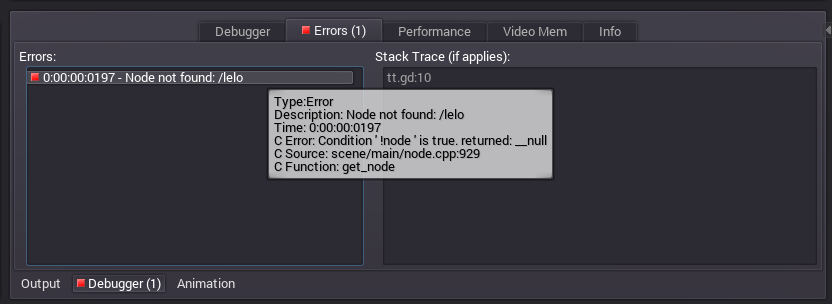
The debugger has seen many improvements too. A new addition is the reporting of run-time errors with proper notifications.
Godot is designed from the ground to attempt handling common crash situations by recovering and reporting an error. This is helpful in production games, as unexpected bugs that might commonly cause a crash will not make it fail. These errors, however, were silently being reported to stdout, so it was not easy to spot them. Added to that, given the debugger does not stop for them, having some context to understand their origin was difficult.
A new section “Errors” was now added which turns red when run time errors occur. Selecting or hovering the error will display a backtrace of script files that led to this situation.
Video memory debugger
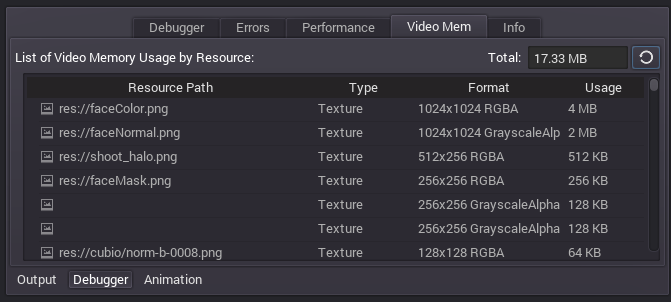
Another new, useful feature is a new Video Memory debugger. This allows to see how much video memory is in use, as well as to discern which resources take up the most amount of video RAM.
Debug on hardware devices
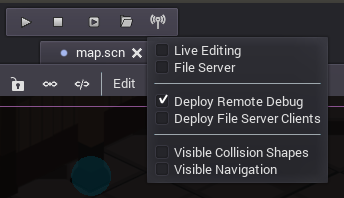
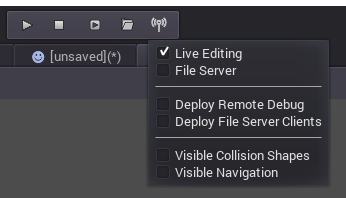
It is also now now possible to debug a game running on an actual devices. Make sure to enable “Deploy Remote Debug” option in the remote options menu. If you have a device with Android 5.0+, Godot can take advantage and debug over the USB cable directly.
Collision and navigation debugging
We added support for debugging collision shapes and navigation polygons, both in 2D and 3D, in run-time. Just select the “Visible Collision Shapes” and/or “Visible Navigation” options in the above menu to enable this.
Live scene editing
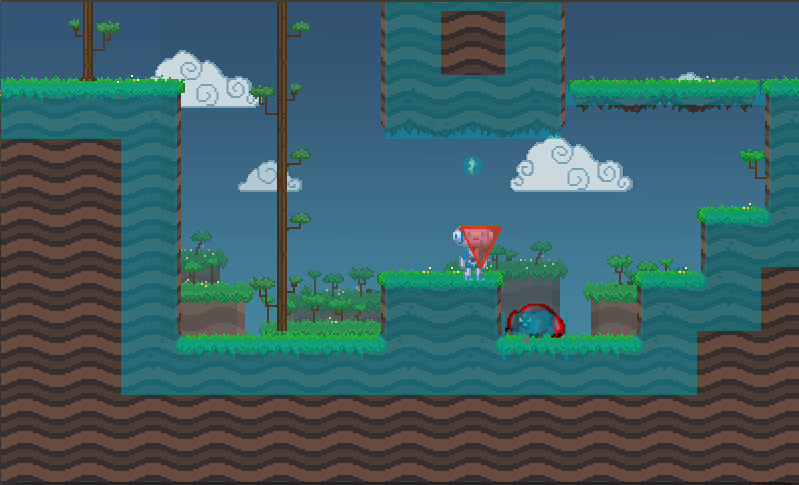
In the vein of larger game engines, Godot has now live editing support. The way it implements this feature is different though. Godot uses IPC to synchronize the editor state with the running game. This means that any change made to the scene being edited is reflected automatically on the running game.
While this approach to live editing does not allow easy inspecting into the game from different editor cameras (something it might be implemented eventually anyway), it has the huge advantage of allowing the possibility of editing a level while it’s being played (and avoid the edited state from being lost when the game stops). Just add enemies, move them around, change their properties, add colliders, platforms, tiles, etc. and everything is reflected instantly on the running game.
To enable live editing, just toggle it at any time from the remote options menu.
Video of live editing in action:
It is also possible to do live editing on an actual device! Just select “Deploy Remote Debug” together with “Live Editing” in the remote options menu:
New color picker
There is a new color picker courtesy of Mariano Suligoy, supporting visual HSV, raw mode, screen picking, favorite colors, and more!

Smaller new additions
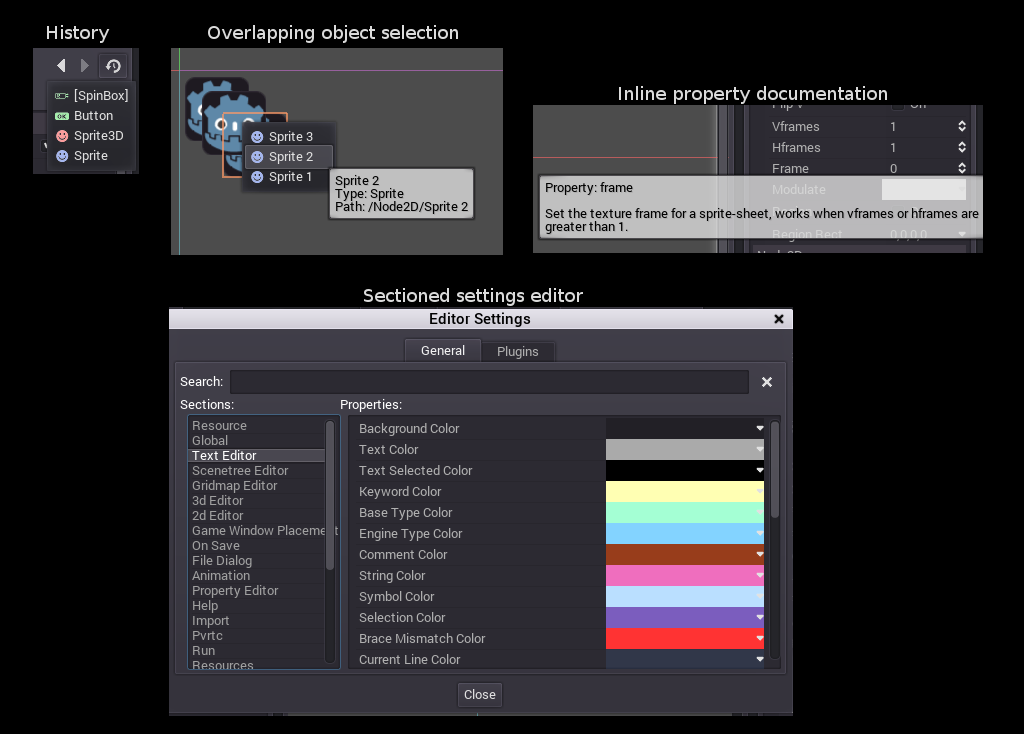
Godot 2.0 brings several smaller new additions to aid in usability:
- Visible history for property editor
- Selection for overlapping objects in 2D and 3D
- Categorized project and editor settings
- Inline documentation as property tooltips
- Array / Dictionary property editing
- Multiple node editing
- New Animation Editor Layout
- Improved anchoring tool
- SpinBoxes (both controls and in property list) can be dragged to change value.
- Many more small additions.
Future
We know the weakest part of Godot is still the 3D engine and we plan to fully work on modernizing it. However, we feel there are several more urgent issues that need to be improved usability wise. Godot 2.1 will continue in the same vein as 2.0 and keep adding usability improvements. (Feel free to check the Roadmap).
Asset sharing
Godot community keeps growing and users keep producing more assets, scripts, modules, etc. we are in need of an unified platform for sharing them. As such, we will be working towards having an asset sharing platform (website + REST API + Godot integration) for 2.1. The built-in platform will be free (it will be integrated with GitHub), but we will make sure that the REST API is well defined so anyone can make a commercial asset sharing platform and integrate it with Godot.
Spread the love!
If you like Godot, let everyone know about it. The more users the better Godot will become. Share this news!
Please donate!
You don’t have to be an experienced C++ developer to help with Godot development! Your donations help us dedicate more man hours to the project and make it progress faster! Donate